SMS Opt-In Methods and Consent Language
ResellPortal LLC (“ResellPortal”, resellportal.com) is a software platform used by small businesses. Text messages are sent on behalf of those businesses through ResellPortal’s platform and every message names the business the recipient dealt with. This page documents every way a person can opt in to receive text messages, with the exact wording shown at the point of opt-in. All consent is optional, never pre-checked, and never a condition of purchase. Mobile numbers and opt-in data are never shared with third parties or affiliates for marketing. See the SMS Privacy Policy and SMS Terms.
1. Business owner account alerts (web form, logged-in dashboard)
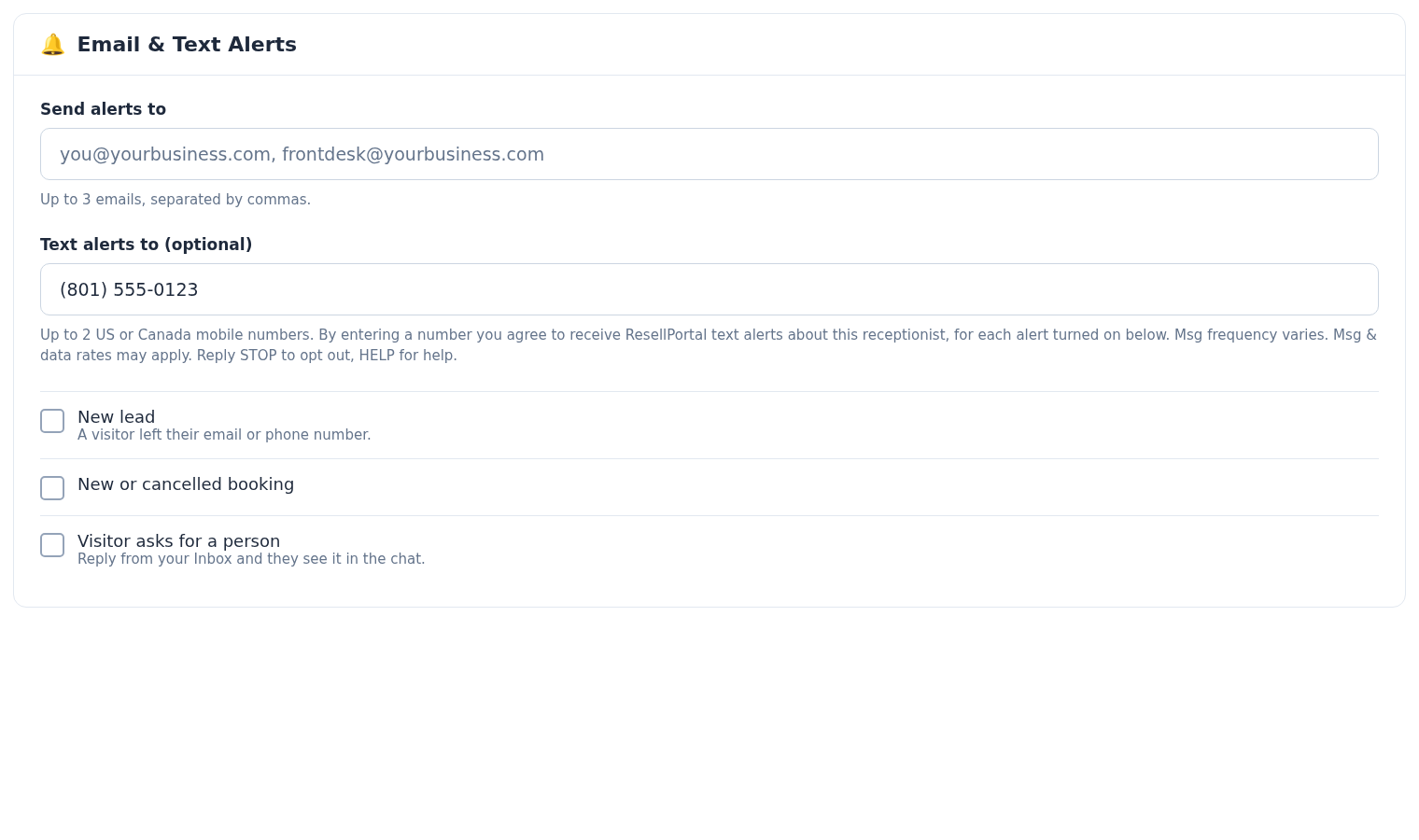
A business owner who uses the platform can choose to receive text alerts about their own account: new leads, new or cancelled bookings, requests for a person, missed calls and voicemails. They opt in by logging in to their dashboard, opening Alerts, and typing their own mobile number into the optional “Text alerts to” field. The field is empty by default. The disclosure shown directly under the field reads:
By entering a number you agree to receive ResellPortal text alerts about this receptionist, for each alert turned on below. Msg frequency varies. Msg & data rates may apply. Reply STOP to opt out, HELP for help.
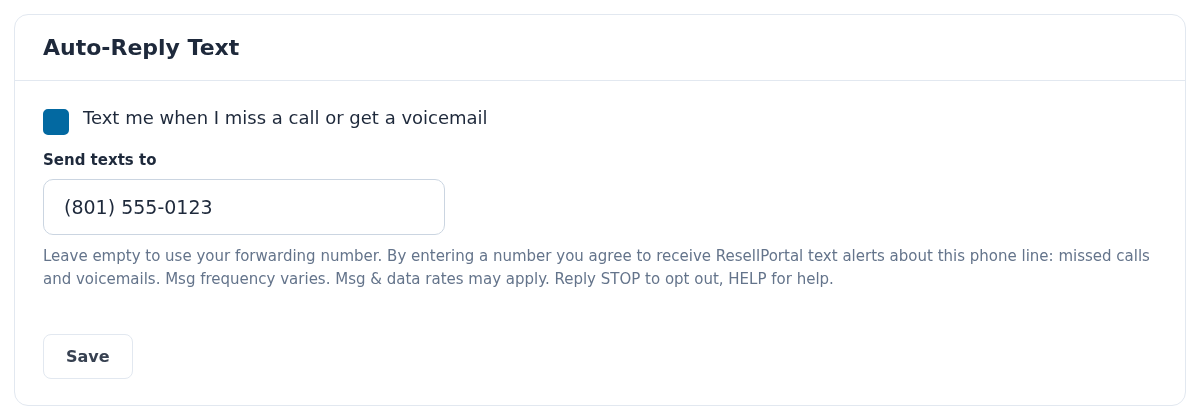
The same pattern is used for Business Phone owner alerts (missed calls and voicemails):
By entering a number you agree to receive ResellPortal text alerts about this phone line: missed calls and voicemails. Msg frequency varies. Msg & data rates may apply. Reply STOP to opt out, HELP for help.
The same mobile can be entered once on the Business Profile page of the logged-in dashboard, in the optional “Mobile for text alerts” field, and every app then uses it for owner alerts. The field carries this disclosure: “Your personal mobile, not the business line. Your apps text you here about new leads, bookings, missed calls and voicemails. By entering a number you agree to receive these text alerts from ResellPortal. Msg frequency varies. Msg & data rates may apply. Reply STOP to opt out, HELP for help.”
Confirmation text sent on opt-in: “ResellPortal Alerts: You are now subscribed to text alerts for your business account. Msg frequency varies. Msg & data rates may apply. Reply STOP to opt out, HELP for help.”
2. Customer website forms and online booking (web form)
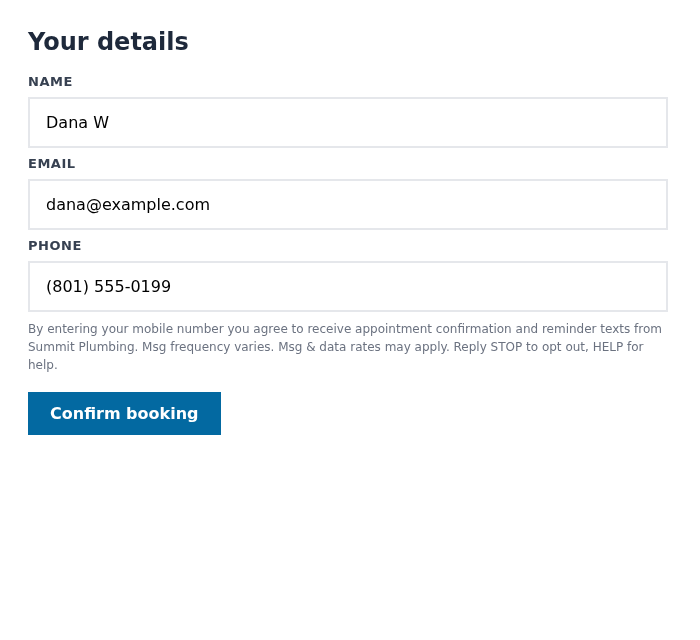
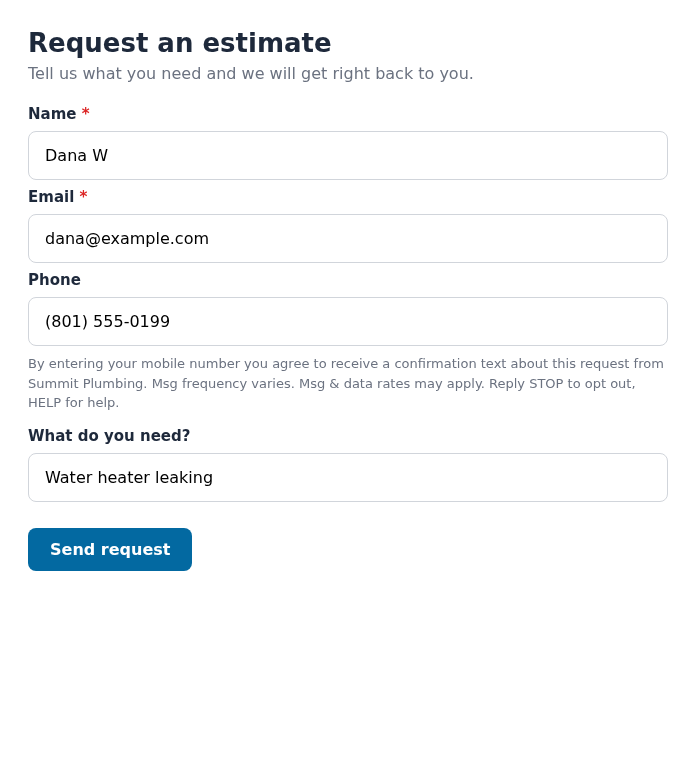
A customer who books an appointment or submits a form on a business’s website may enter a mobile number in an optional Phone field. The disclosure appears directly under the field, naming the business. The customer then receives only the confirmation and reminder texts for that request.
By entering your mobile number you agree to receive appointment confirmation and reminder texts from [Business Name]. Msg frequency varies. Msg & data rates may apply. Reply STOP to opt out, HELP for help.
By entering your mobile number you agree to receive a confirmation text about this request from [Business Name]. Msg frequency varies. Msg & data rates may apply. Reply STOP to opt out, HELP for help.
3. Verbal opt-in through the business’s AI receptionist (phone call or website chat)
When a customer books an appointment by talking to a business’s AI receptionist, the receptionist collects a name and email, then follows this exact script before any text message is sent:
Receptionist: “Would you like a text confirmation and reminder at this number?”
Customer: “Yes.”
Receptionist: “Message and data rates may apply. Reply STOP any time to opt out.”
Only if the customer says yes is the mobile number stored for texting and the confirmation and reminder sent. If the customer declines, no number is kept for texting. On a phone call the receptionist may also offer to text details the caller asked for (an address, website or hours); it sends that single text only after the caller agrees.
4. Missed-call reply (consumer-initiated)
When a customer calls a business’s own phone number and the call is not answered, the business can have one automatic text reply sent to the number that just called, telling the caller the business will get back to them. The customer initiated the contact by calling; no other messages follow unless the customer replies.
5. Account messages the customer asked the business for
Businesses can text a customer a link the customer requested from them: an invoice or estimate to review and pay, a document to sign, a payment receipt, or a request for a review after a visit. The business enters the mobile number the customer provided to them for that purpose. Every first message to a number includes “Reply STOP to opt out.”
Message frequency, rates and keywords
- Message frequency varies by account activity. Msg & data rates may apply.
- Opt out at any time by replying STOP, CANCEL, QUIT, END, UNSUBSCRIBE, STOPALL or REVOKE. Reply START to resubscribe.
- Reply HELP or INFO for help, or contact support@resellportal.com.
- Carriers are not liable for delayed or undelivered messages.
Sample messages: “Summit Plumbing: Your appointment is confirmed for Thu Nov 5 at 2:00 PM. Reply STOP to opt out.” · “Summit Plumbing: Thanks for calling! We missed your call but will get back to you shortly. Reply STOP to opt out.” · “Summit Plumbing: New lead from your website: Dana W, (801) 555-0199, water heater leaking. Reply STOP to opt out.”